
Customisation on Subcontracting Order Type
In Sage X3, we can create a new transaction against the previous Purchase or Sales transaction. For Example, we can create Sales Delivery against Sales Order, Purchase Receipt against Purchaser Order, Sales Invoice against Delivery or Order and so on. Similarly, we can create Purchase Order against Work Order by following the standard process.
But as we know, document type of Purchase Order will be selected by default while creating new Purchase Order entry from the Work Order. You will not get option to choose Order Type.
Recently we had a requirement from one of our client, if the Purchase Order is created from the Work Order screen then by default the system should take order type as “Subcontracting”. Any other order type other than “Subcontracting” will not be selected in this case. Whenever the user is creating the direct Purchase Order from Purchase Order screen then in the order type drop down field the user can choose any order type as per his convenience.
We will see the functionality in detail:
- Navigate to: Manufacturing -> Planning -> Work Order -> All full entry
New Stuff: Error “Non-blocking difference“ Error format ZDEPCODE K:20B in Sage X3
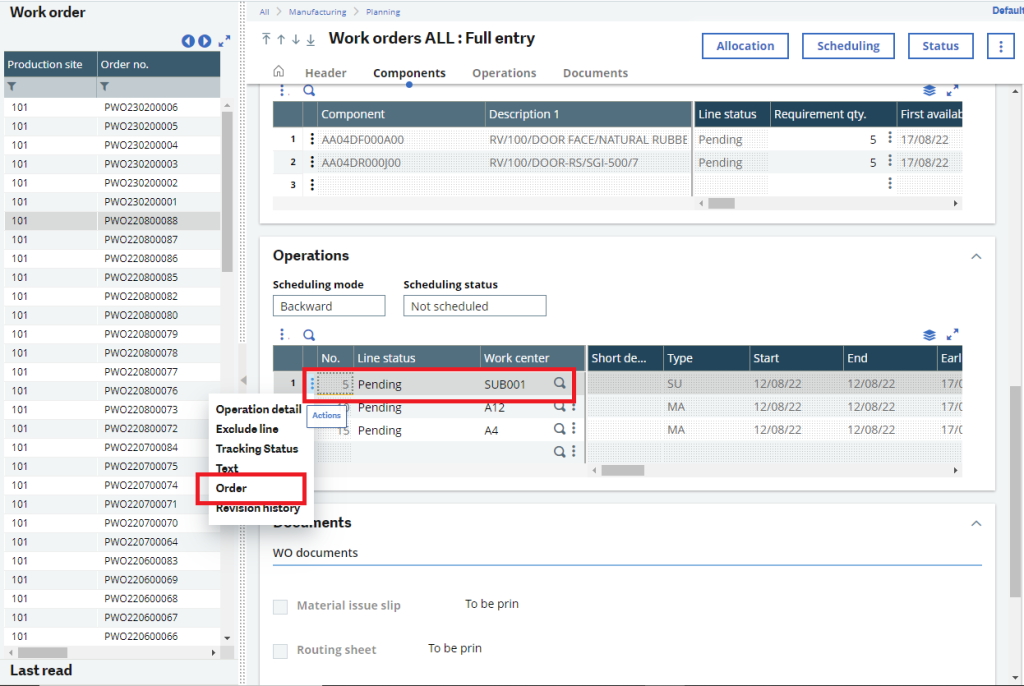
Fig 1: Work Order
If the user creates the Work Order and on the basis of that work order he created the Purchase Order as shown in the above screenshot then by default the system will choose order type as subcontracting Order type.
- Purchasing -> Order -> Order – > All full entry
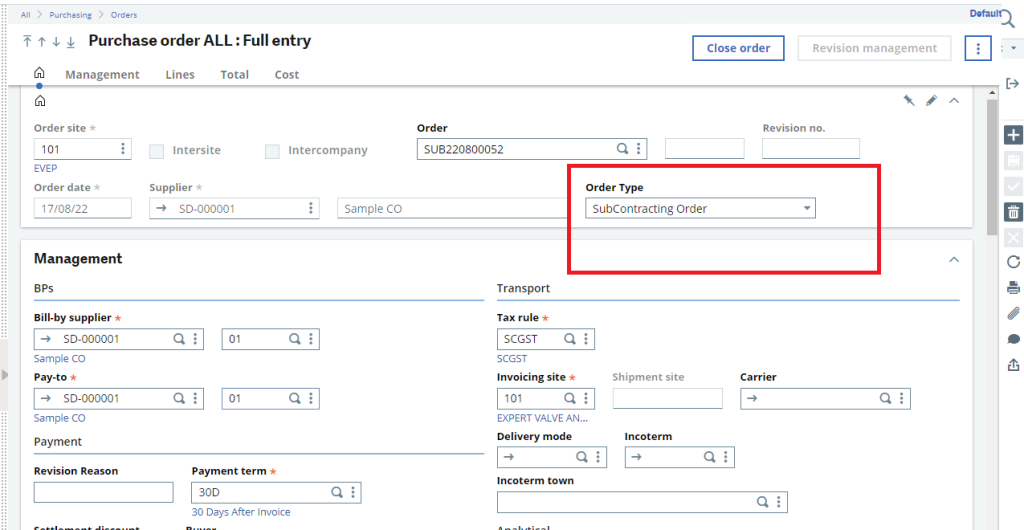
Fig 2 : Order Type
As shown in the above Screenshot whichever Purchase Order transaction is made through the work order then by default an order type as Subcontracting type will get selected in the Purchase Order screen and the entry no will be created with a prefix “SUB”.
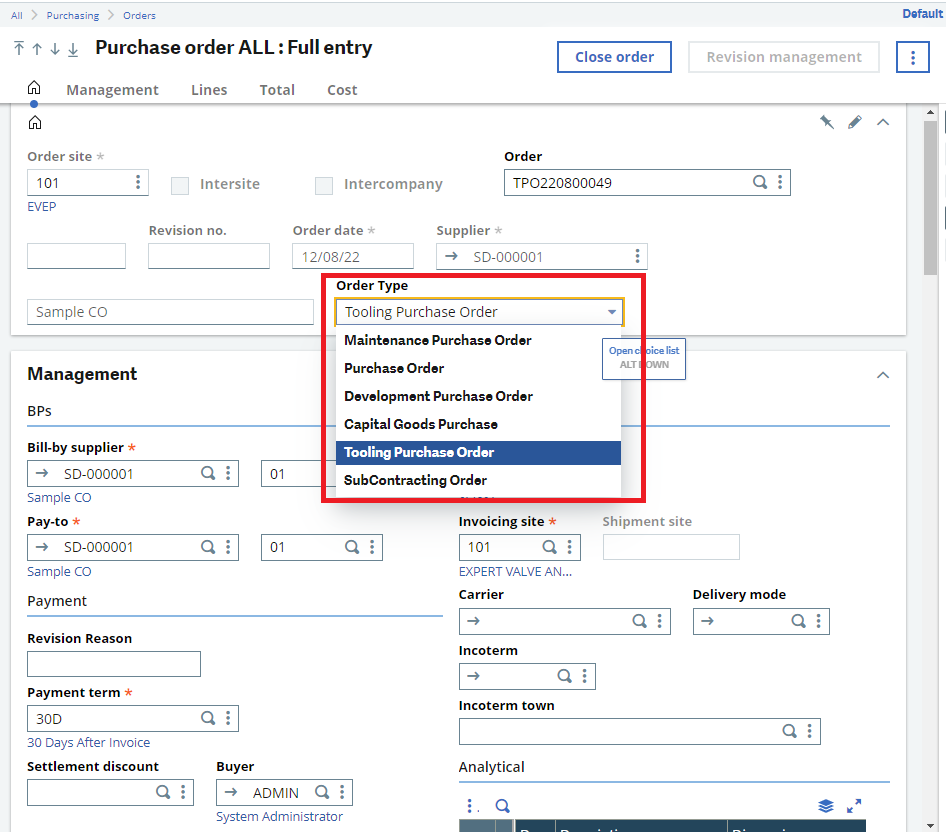
Fig 3 : Drop down in Order Type
If the User needs to create the Purchase Order directly from the Purchase Order screen, he will get an option to select any option from the order type drop-down. After selecting the Order Type, an entry number will be generated with the respective prefix on the basis of the order type chosen by the end user in the Order Type drop-down field.
So, we can add a specific transaction type condition while creating a new transaction against the previous different type transaction and the entry number will be generated on the basis of the transaction type selected while creating the new entry.
About Us
Greytrix – a globally recognized and one of the oldest Sage Development Partners is a one-stop solution provider for Sage ERP and Sage CRM organizational needs. Being acknowledged and rewarded for multi-man years of experience, we bring complete end-to-end assistance for your technical consultations, product customizations, data migration, system integrations, third-party add-on development, and implementation competence.
Greytrix caters to a wide range of Sage X3, a Sage Business Cloud Solution, offerings. Our unique GUMU™ integrations include Sage X3 for Sage CRM, Salesforce.com, Dynamics 365 CRM, and Magento eCommerce along with Implementation and Technical Support worldwide for Sage X3. Currently we are Sage X3 Implementation Partner in East Africa, Middle East, Australia, Asia, US, UK. We also offer best-in-class Sage X3 customization and development services, integrated applications such as POS | WMS | Payment Gateway | Shipping System | Business Intelligence | eCommerce and have developed add-ons such as Catch – Weight and Letter of Credit and India Legislation for Sage X3 to Sage business partners, end users and Sage PSG worldwide. Greytrix Sales Commission App for Sage X3 simplifies commission calculations and postings on sales transactions.
The GUMU™ Cloud framework by Greytrix forms the backbone of cloud integrations that are managed in real-time for the processing and execution of application programs at the click of a button.
Greytrix is a recognized Sage champion ISV Partner for GUMU™ Sage X3 – Sage CRM integration also listed on Sage Marketplace; GUMU™ integration for Sage X3 – Salesforce is a 5-star rated app listed on Salesforce AppExchange and GUMU™ integration for Dynamics 365 CRM – Sage ERP listed on Microsoft AppSource.
For more information on Sage X3 Integration and Services, please contact us at x3@greytrix.com, We would like to hear from you.