
How to solve Sequencing issue of Left Panel
Recently, in the Quality Control screen, we were facing a sequencing issue for the History section. In the Quality Control screen, entries in which all the items are approved or rejected with 0 items in Q status will be transferred to the History section. In this case, logically the latest entry should be displayed first in the left panel. But the latest entry is getting displayed in the last row at the end. It is coming in the LIFO order which is wrong.
Refer below screenshot in which we have approved the total quantity of the GRN entry in the Quality Control screen.
New Stuff: Work Order REL unit update customization in Sage X3
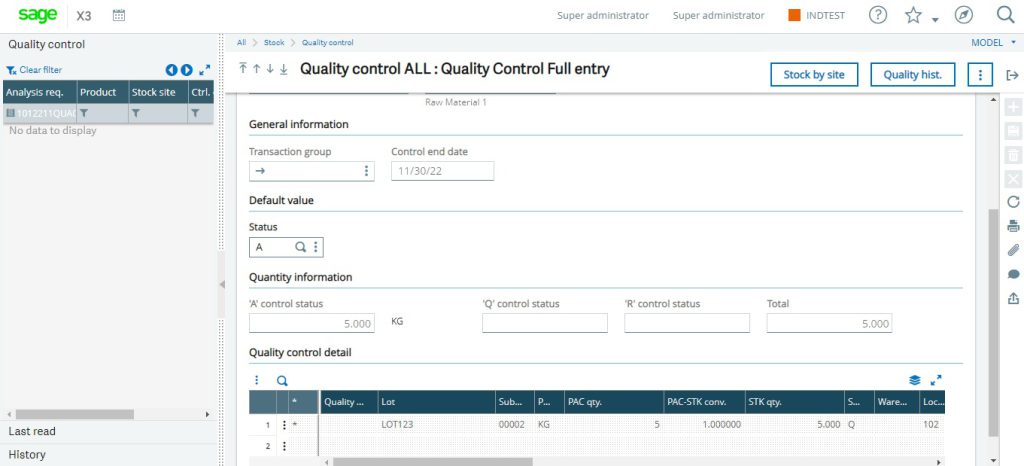
Total Quantity – Approved
So, this QC Entry – 1012211QUA00000008 will be displayed in the history section now.
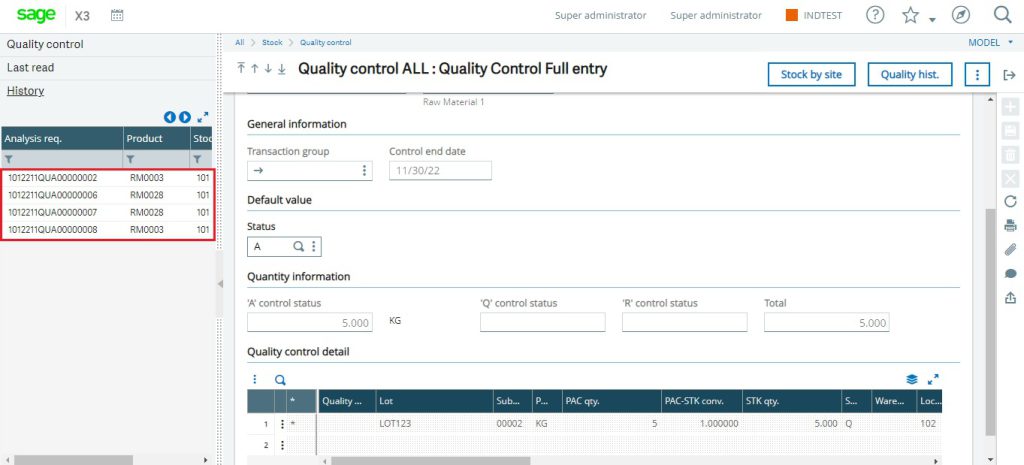
Sequencing Issue
As we have done QC of this entry, this entry will be considered the latest entry.
But, 1012211QUA00000008 is getting displayed at the end. So it will be difficult for user to find the latest entries in section of Quality Control screen if there are multiple entries available in the same section.
We are facing this issue because the sequencing order for this section of left panel is not correct.
To solve this issue, you just need to follow simple and easy steps:
Step 1: Go to Development -> Script Dictionary -> Windows.
Step 2: Search “OSTQ” (Quality Control Screen) window.
Step 3: Select Browser tab and check “sign” saved for the History section.
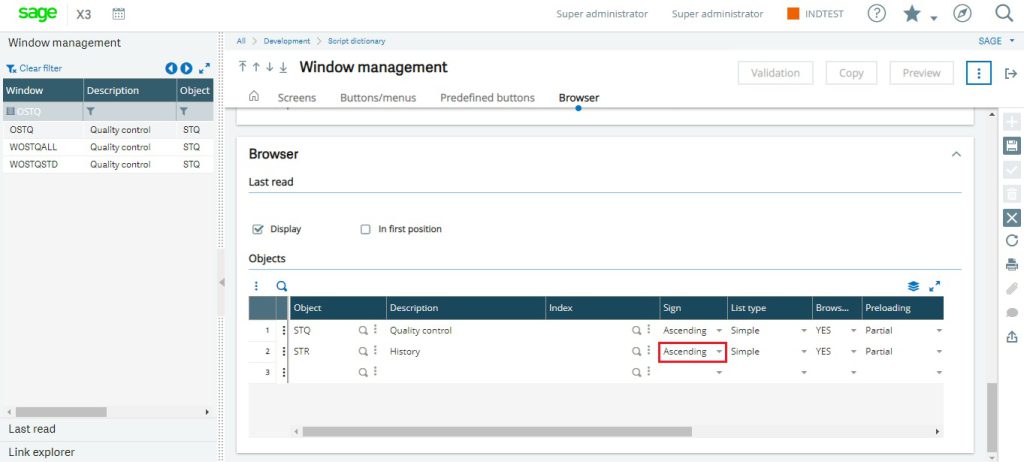
Sign = Ascending
As you can see in the above screenshot, sign = Ascending.
STEP 4: Change it to “Descending” and save the record.
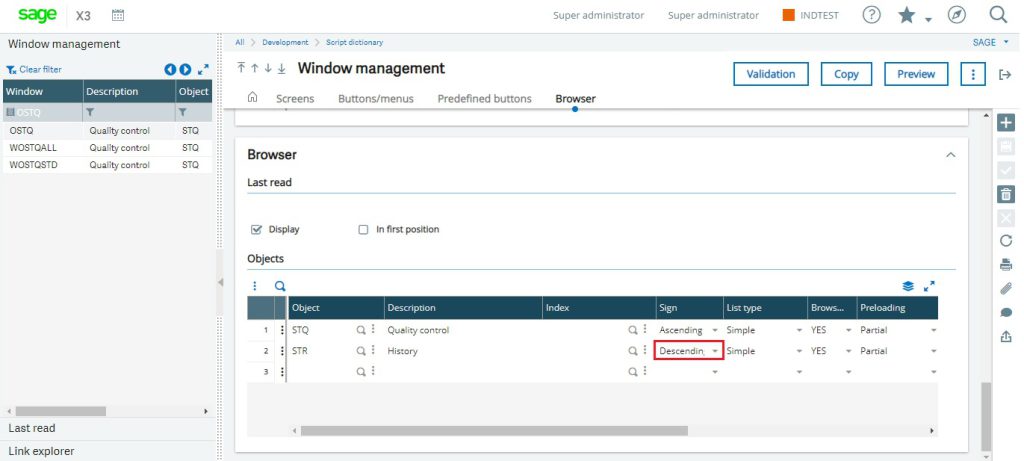
Descending
STEP 5: Global validate the window.
Step 6: Go to Setup -> Stock -> Entry Transactions -> Quality Control Screen.
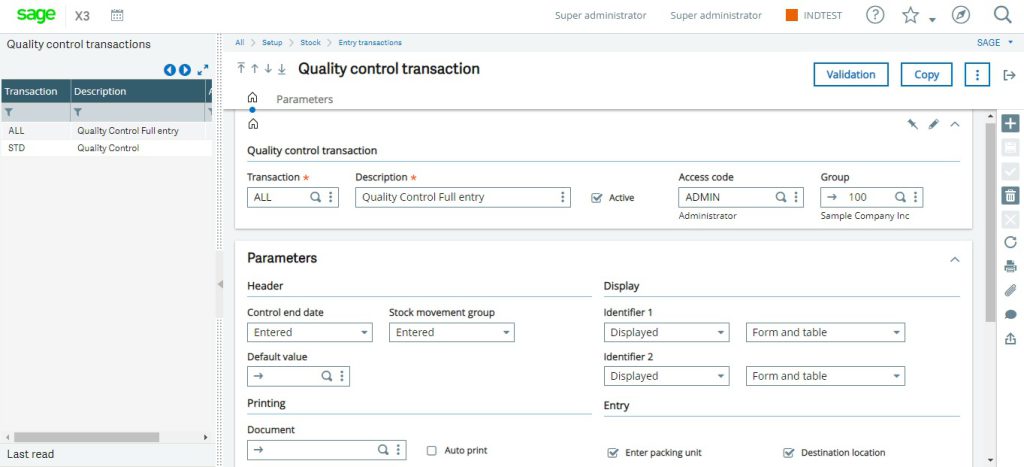
Transaction type of Quality screen
Step 7: Validate all the Transaction Types and check.
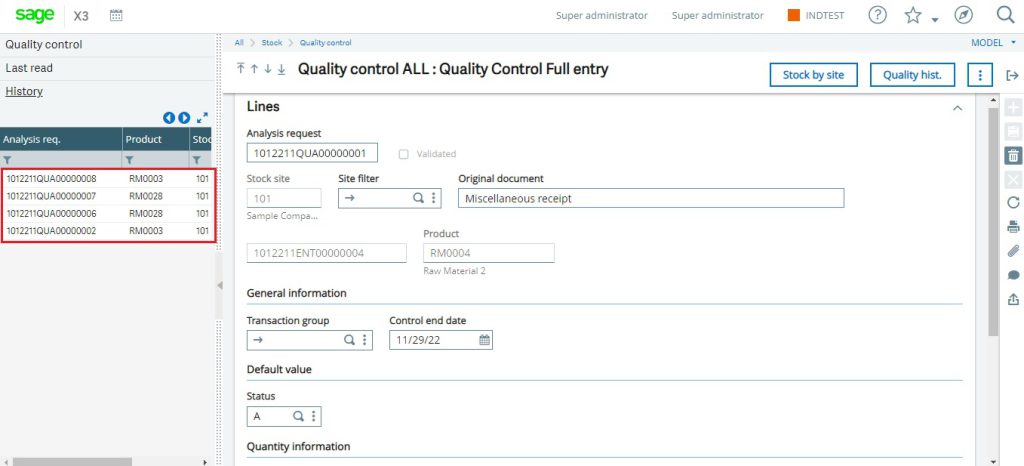
Proper Sequencing
As you can see, QC entry – 1012211QUA00000008 is now getting displayed in the first row of the left panel in the history section of the quality control screen.
This is just an example of a Quality Control screen. By following these simple steps, we can solve the sequencing issue of the left Panel in any screen.
About Us
Greytrix – a globally recognized and one of the oldest Sage Development Partners is a one-stop solution provider for Sage ERP and Sage CRM organizational needs. Being acknowledged and rewarded for multi-man years of experience, we bring complete end-to-end assistance for your technical consultations, product customizations, data migration, system integrations, third-party add-on development, and implementation competence.
Greytrix caters to a wide range of Sage X3, a Sage Business Cloud Solution, offerings. Our unique GUMU™ integrations include Sage X3 for Sage CRM, Salesforce.com, Dynamics 365 CRM, and Magento eCommerce along with Implementation and Technical Support worldwide for Sage X3. Currently we are Sage X3 Implementation Partner in East Africa, Middle East, Australia, Asia, US, UK. We also offer best-in-class Sage X3 customization and development services, integrated applications such as POS | WMS | Payment Gateway | Shipping System | Business Intelligence | eCommerce and have developed add-ons such as Catch – Weight and Letter of Credit and India Legislation for Sage X3 to Sage business partners, end users and Sage PSG worldwide. Greytrix Sales Commission App for Sage X3 simplifies commission calculations and postings on sales transactions.
The GUMU™ Cloud framework by Greytrix forms the backbone of cloud integrations that are managed in real-time for the processing and execution of application programs at the click of a button.
Greytrix is a recognized Sage champion ISV Partner for GUMU™ Sage X3 – Sage CRM integration also listed on Sage Marketplace; GUMU™ integration for Sage X3 – Salesforce is a 5-star rated app listed on Salesforce AppExchange and GUMU™ integration for Dynamics 365 CRM – Sage ERP listed on Microsoft AppSource.
For more information on Sage X3 Integration and Services, please contact us at x3@greytrix.com, We would like to hear from you.